Better Jira Time Tracking: How to reduce manual logging and improve time data
Better Jira Time Tracking: Reduce Manual Logging
Timesheet Tracking for Jira
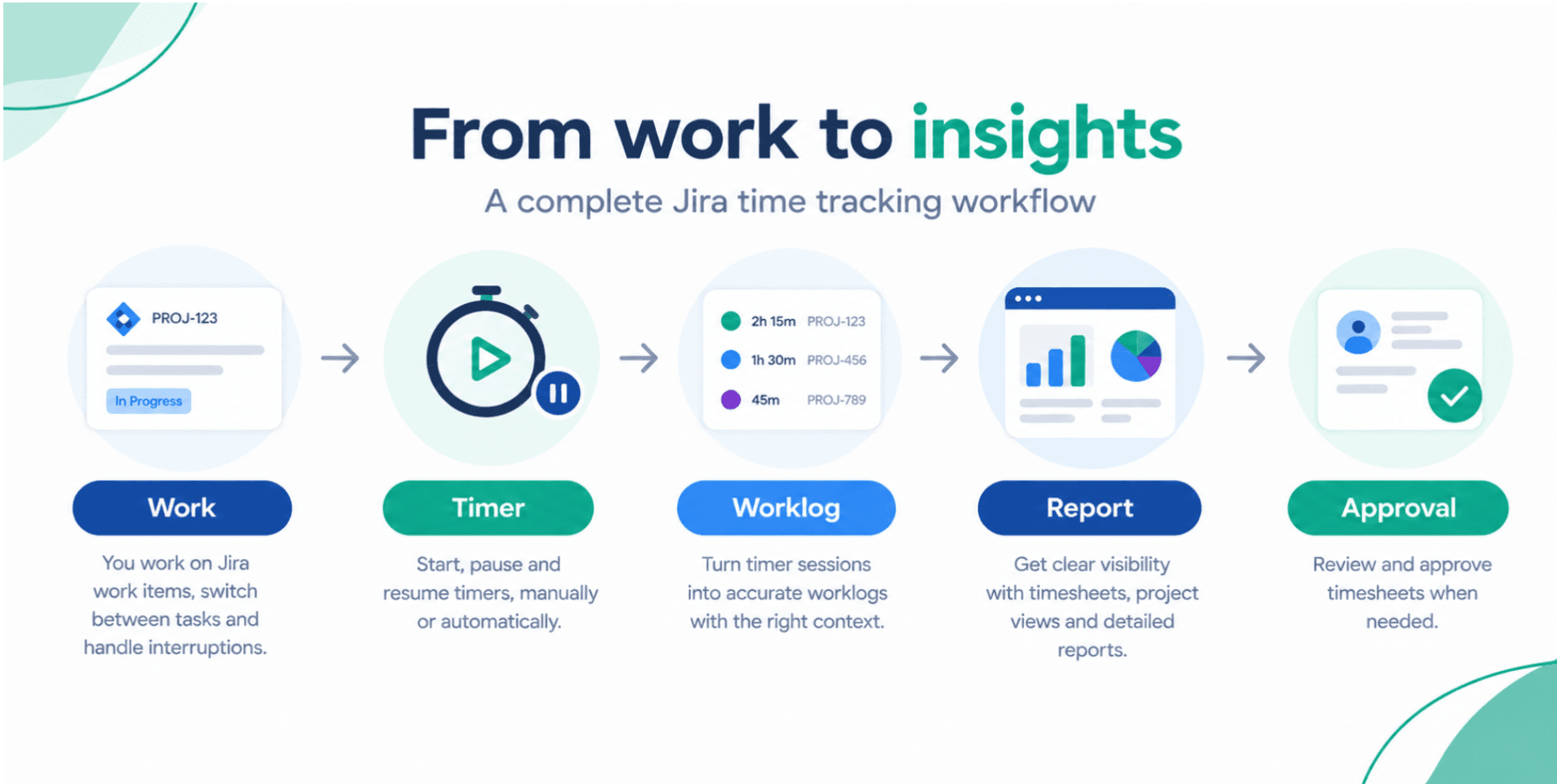
Better Jira Time Tracking: How to reduce manual logging and improve time data
Time tracking sounds simple until you actually have to do it every day.
You start the morning working on one Jira work item. Then a meeting comes up. You switch to another task, answer a colleague's question, return to the first item, and later spend another hour on something completely different.
At the end of the day, you need to remember all of it and turn it into Jira worklogs.
And that is where things often go wrong.
The issue is not necessarily that people do not want to track their time. It is that real work rarely happens in neat, uninterrupted blocks.
When time tracking depends too much on memory and manual entry, some activities get forgotten, durations become estimates, and timesheets turn into a Friday afternoon exercise.
Better Jira time tracking is not about asking people to log more. It is about making accurate logging easier.
TL;DR
A practical Jira time tracking workflow should help teams:
- Capture time close to when the work actually happens
- Handle interruptions and frequent task switching
- Reduce manual and retrospective worklog entry
- Add useful context such as activity type or billable status
- Adapt tracking rules to different teams and projects
- Give managers visibility at work item and project level
- Turn worklogs into useful reports
- Support review and approval when required
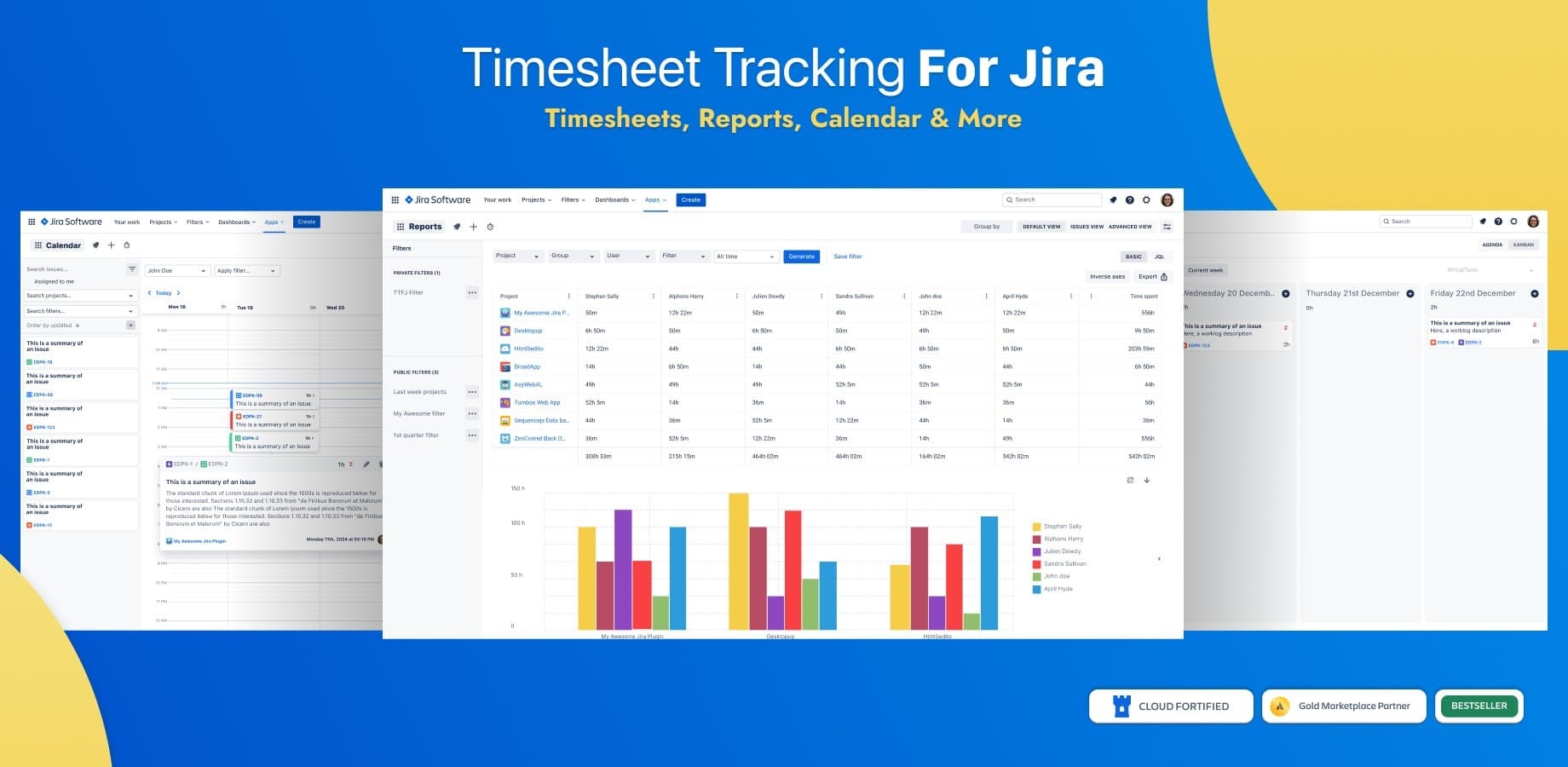
Timesheet Tracking for Jira brings timers, timesheets, planning, reporting, work attributes, calendars and approval workflows into Jira. It includes manual and automatic timers, reports, timeline views, planning, schedules and holidays, work attributes, and an approval process in the Advanced edition.
Why accurate time tracking in Jira is harder than it sounds
Imagine a developer who spends 45 minutes investigating a bug. They then move to a feature request for 30 minutes before joining a meeting.
After the meeting, they return to the bug for another hour.
Later, they help a teammate for 20 minutes.
Now they have four different activities to record.
If they log everything immediately, the process can interrupt their work. If they wait until the end of the day, they have to reconstruct what happened. Wait until Friday, and the details become even harder to remember.
This can lead to incomplete Jira worklogs, inaccurate durations, forgotten activities and last-minute timesheet completion.
It also creates extra work for managers who depend on that data for project planning, reporting, billing or client work.
The quality of your time data is closely connected to how easy it is for people to capture it.
Common time tracking problems Jira teams face
Reconstructing the week from memory
The classic situation is Friday afternoon.
You open your Jira timesheet and start asking yourself:
"What did I work on Tuesday?"
"Was that two hours or three?"
"Did I log the meeting?"
"Which task did I work on before lunch?"
Retrospective logging can never be as reliable as capturing time close to the actual work.
It is especially difficult for people who work across multiple Jira work items during the same day.
Switching between tasks throughout the day
Traditional start-and-stop tracking can become inconvenient when work is fragmented.
You may start tracking one Jira work item, pause it for a meeting, start another task, then return to the original one later.
A useful Jira timer should accommodate this reality rather than force users to start from scratch each time.
Timesheet Tracking for Jira supports timers that can be started, paused and resumed. Timer portions can then be converted into one or several worklogs.
One tracking setup does not fit every team
A consulting team and an internal engineering team may both use Jira, but they do not necessarily need the same time tracking process.
A consultant may need to distinguish between billable and non-billable hours. An engineering team may care more about activity type or simply the time spent on a work item.
Making every team complete the same fields can create unnecessary friction.
Time tracking should reflect how the team actually works.
Logging time is only half of the process
A worklog is useful, but it is rarely the end of the story.
Organizations may also need to review, report on and approve the information.
A simple workflow can look like this:
Track → review → report → approve
The goal is to create a process where each step adds value rather than another layer of administration.
What a better Jira time tracking workflow looks like
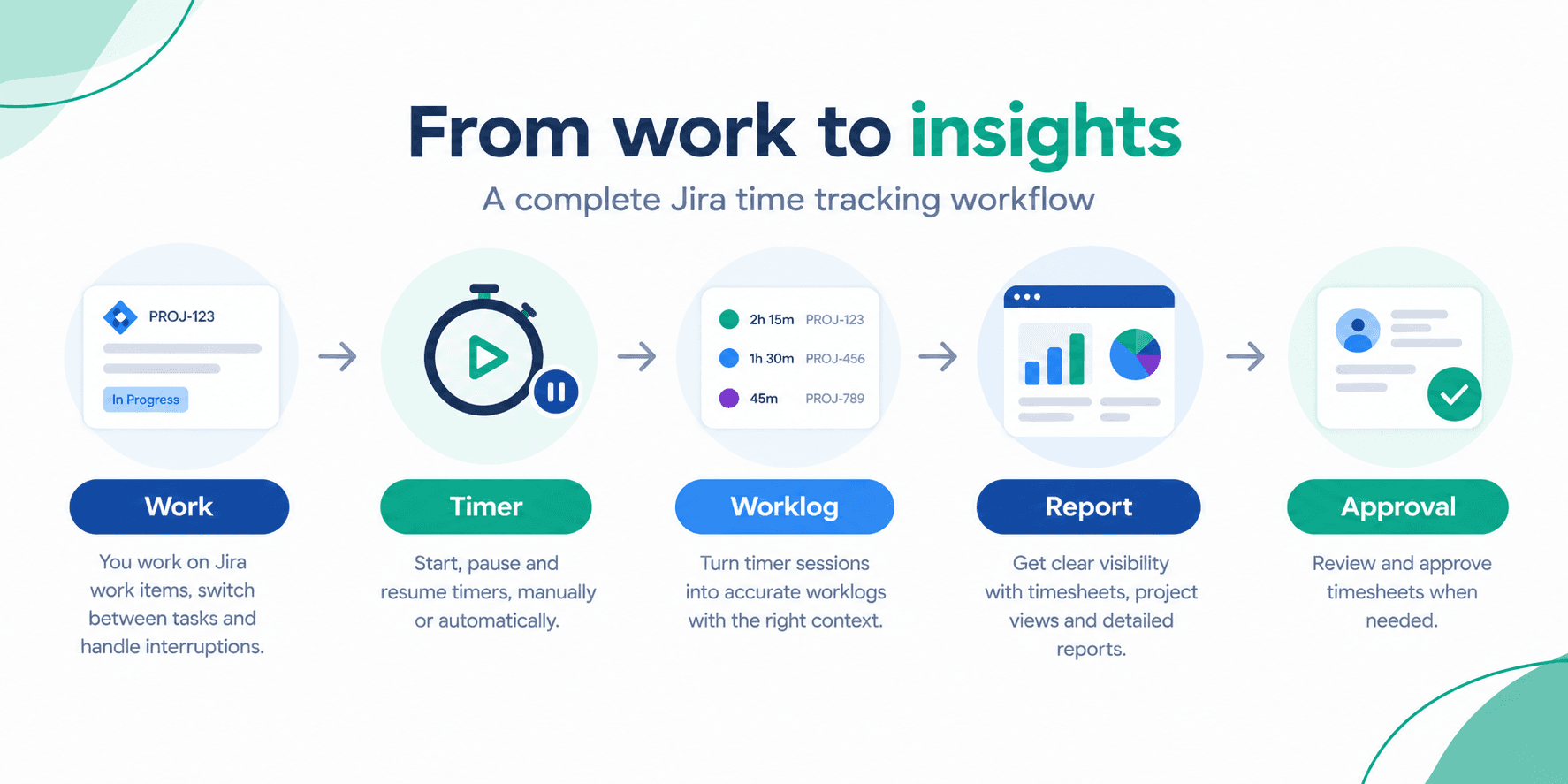
A practical workflow should make eight things easier:
- Capture time while work is happening
- Handle interruptions and task switching
- Reduce retrospective manual entry
- Add relevant context to worklogs
- Adapt tracking to different teams or projects
- Review time at both work item and project level
- Turn collected data into useful reports
- Create an approval process when needed
The important point is that more logged hours do not automatically mean better data.
The objective is better accuracy with less effort.
Automatic and manual time tracking in Jira
Different types of work call for different tracking methods.
When automatic timers make sense
Automatic time tracking in Jira can be useful when a team's workflow follows predictable rules.
For example, a team could configure time tracking to start when a work item moves to In Progress and stop when it moves to another status.
Timesheet Tracking for Jira includes advanced automatic timers and supports conditions based on Jira workflow context, including JQL. It also provides schedules and holiday settings that can be used as part of the tracking setup.
This approach can remove a repetitive step from the user's day.
Instead of remembering to start a timer, the workflow can handle predictable situations automatically.
When a manual Jira timer is more practical
Not every workday is predictable.
Consider this example:
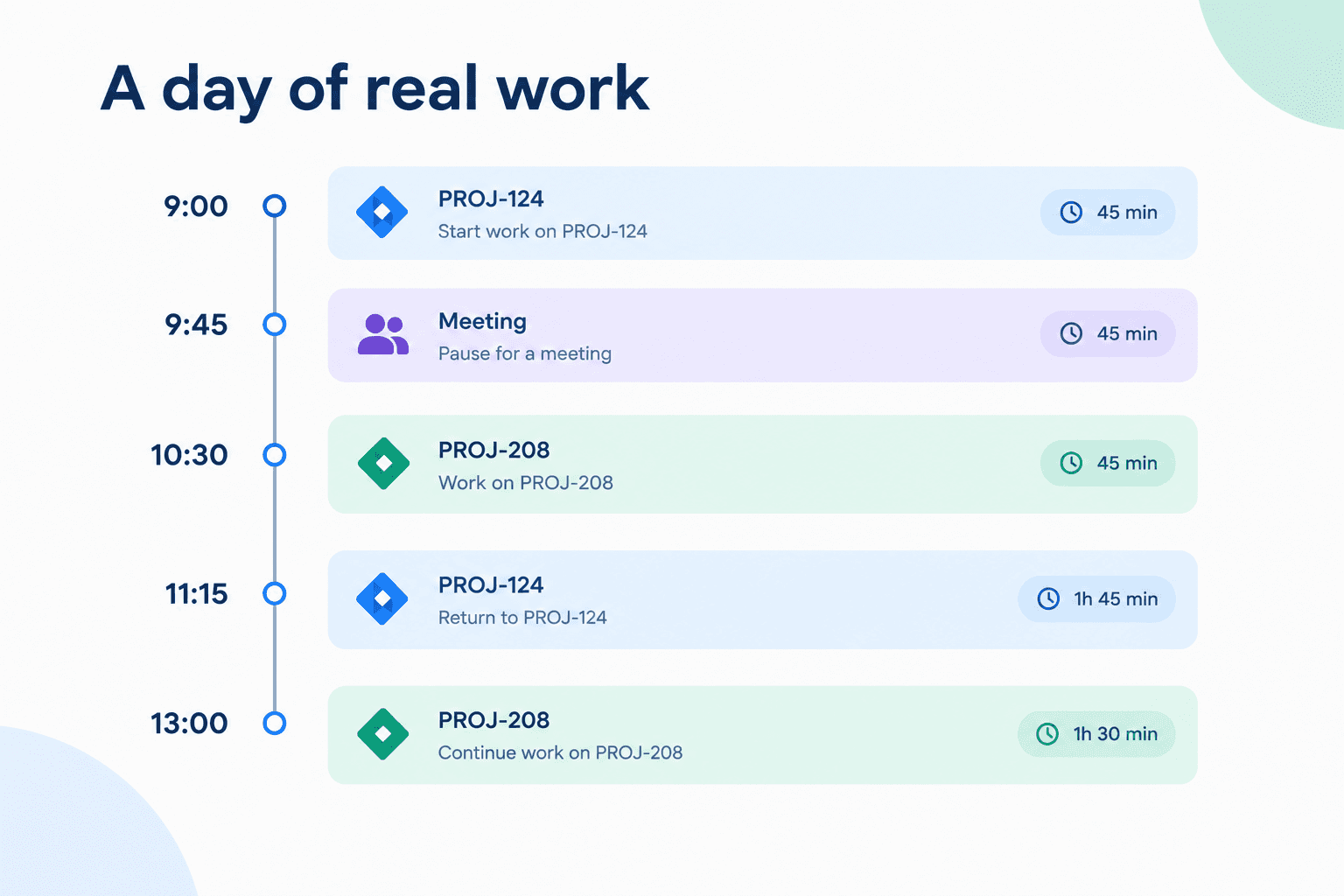
A manual timer that supports pause and resume makes this kind of day much easier to capture.
With Timesheet Tracking for Jira, users can start, pause and resume timers, then convert the recorded segments into Jira worklogs.
That means the user does not have to remember every individual session later.
The configuration can be tailored to the relevant Jira context rather than treating every team as if it works in exactly the same way.
Make worklogs useful, not just accurate
Accurate time is only one part of useful time data.
Sometimes you also need to know what the time was spent on.
For example:
- Billable or non-billable
- Activity type
- Client-related information
- Internal categories
- Other organization-specific attributes
Timesheet Tracking for Jira supports work attributes, allowing additional context to be associated with time entries.
Why project-specific context matters
Not every attribute belongs everywhere.
Imagine a consulting project where billable status is essential. The same field may be unnecessary for an internal engineering project.
A better setup lets organizations collect the information they actually need without turning every Jira timesheet into a long form.
The principle is simple: capture useful context, not information for the sake of having more fields.
From individual worklogs to a complete view of project time
A developer may only need to know what they worked on today.
A project manager needs a much wider view.
They may want to understand:
- How much time a project consumed
- Which work items received the most effort
- How time was distributed across projects
- Planned versus logged work
- Where additional investigation may be needed
This is where Jira time tracking reports become important.
Timesheet Tracking for Jira provides Issue, Project and Worklog views. Its Issue Context can also summarize worklogs and plans across Jira hierarchy levels, while the app also gives teams a broader view of their projects and how work progresses over time.
Reporting without losing the Jira context
A total such as "120 hours spent" does not tell you much by itself.
A useful report should help answer what those hours represent.
Were they spent on planned work? A production issue? Client requests? A project that is running behind schedule?
The closer your reporting stays to the Jira context, the easier it becomes to turn time data into something actionable.
Building a time approval process that works for your teams
Some organizations need more than tracking and reporting.
They need approval.
A typical process might look like:
Employee logs time → manager reviews → corrections if needed → approval → finalized record
Timesheet Tracking for Jira's Advanced edition includes an approval process designed to combine actual work hours with scheduled days off.
Approval does not have to look the same for everyone.
One team might review timesheets weekly. Another might use a monthly process.
Distributed teams may also need to consider different schedules and holidays.
The important thing is to define the process before turning approval into another administrative checkbox.
How to improve Jira time tracking without adding more admin work
A few practical rules can make a significant difference:
Track time as close to the actual work as possible.Do not make employees reconstruct an entire week whenever possible.
Use automation where the workflow is predictable.If a status change consistently represents the beginning or end of work, automation can help.
Use manual timers when work is fragmented.People need flexibility when their day does not follow a predictable pattern.
Avoid irrelevant fields.Not every project needs the same worklog attributes.
Give managers project-level visibility.Individual worklogs become more useful when they can be viewed in a wider project context.
Build a clear review process.If timesheets need approval, define who reviews them and when.
Account for schedules and holidays.Working time is not the same for every person or region.
Use reports to identify patterns, not just totals.The interesting question is often why time was spent, not simply how much was logged.
How Timesheet Tracking for Jira brings the workflow together
This is where time tracking goes beyond simply recording hours, connecting daily work with worklogs, reporting and approval.
Timesheet Tracking for Jira brings several parts of the process into the Jira environment, including timers, timesheets, reporting, timeline views, planning, calendars, work attributes and approvals.
The relevant capabilities include:
- Manual and automatic timers
- Pause and resume timer workflows
- Automatic worklog creation
- Timesheet views
- Project and worklog visibility
- Work attributes
- Reports and dashboards
- Planning and calendar views
- Schedules and holidays
- Timesheet approval workflows
The platform brings together timesheets, active timers and analytics, with Issue, Project and Worklog views that help teams understand how time is distributed.
The advantage is not simply having more features.
It is having a workflow that can follow the way people already work in Jira.
**Explore Timesheet Tracking for Jira on Atlassian Marketplace!**
Common Jira time tracking mistakes to avoid
Even a good Jira time tracking setup can become frustrating if the process itself is poorly designed.
Avoid these common mistakes:
- Relying entirely on end-of-week manual logging
- Assuming every team should track time in the same way
- Making too many worklog fields mandatory
- Tracking time without deciding how the data will be used
- Collecting worklogs but never reviewing them
- Treating approval as purely administrative
- Ignoring different working schedules and holidays
- Looking at reports without the context behind the numbers
- Automating time tracking without considering the actual Jira workflow
The best setup is usually not the one with the most rules.
It is the one people can realistically follow every day.
FAQs
How can I track time in Jira?
You can track time using Timesheet Tracking for Jira. Your complete setup can include timers, timesheets, reporting and approval workflows.
Can Jira automatically track time?
Automatic time tracking can be implemented through Jira-based automation and Timesheet Tracking for Jira, which provides automatic timers that can be configured around Jira workflow conditions.
Can I pause and resume a Jira timer?
Yes. Timesheet Tracking for Jira supports pausing and resuming timers, with the recorded portions convertible into worklogs.
How can teams reduce manual time logging in Jira?
Start by identifying where manual entry causes the most friction. Use automatic tracking for predictable workflows and manual timers for fragmented work. Then add only the worklog context your team actually needs.
Can Jira track billable hours?
Jira time tracking can be used to record time for billing purposes. Timesheet Tracking for Jira also supports work attributes and reporting that can provide additional context for time data.
Can Jira time tracking be configured differently for different projects?
The right setup can use project-specific context and tracking rules rather than forcing identical requirements across all teams.
How can managers approve timesheets in Jira?
A timesheet approval workflow can add a review stage before time data is finalized. Timesheet Tracking for Jira includes an approval process in its Advanced edition.
How can Jira time tracking data be used for reporting?
Time data can be analyzed by work item, project, user or other relevant dimensions. Timesheet Tracking for Jira provides reports, timeline views, project overview and dashboard gadgets.
Can Jira time tracking account for holidays and working schedules?
Yes, dedicated time tracking workflows can account for schedules and holidays. Timesheet Tracking for Jira includes schedules and holidays as part of its feature set.
Final thought
Good Jira time tracking is not about making people account for every minute.
It is about making the right information easier to capture while the work is happening.
When teams can switch between tasks, pause and resume timers, automate predictable tracking, add relevant context and review their data in Jira, time tracking becomes less of an administrative burden.
And when the data is easier to capture, it is also easier to trust.
Ready to make time tracking less manual?
**Try Timesheet Tracking for Jira**
Written by _Anahit Sukiasyan_
_Anahit is an Atlassian Certified Professional and Community Champion, recognized for her dedication to fostering collaboration, innovation, and knowledge-sharing within the global Atlassian ecosystem. With a strong background in IT Service Management, she has extensive hands-on experience with Jira, Jira Service Management, Confluence, Trello, and Jira Product Discovery, working across both Cloud and Data Center environments. Anahit specializes in end-to-end Jira project configuration, tailoring workflows, automation, and reporting to align with diverse business needs and improve operational efficiency._
_Beyond her technical skills, Anahit is deeply committed to building and nurturing communities. Being an organizer of the Atlassian Community in Yerevan, she actively connects professionals, facilitates learning opportunities, and empowers users to get the most out of Atlassian tools._
__

Ready to track time in Jira?
Start your free 30-day trial of Timesheet Tracking on the Atlassian Marketplace.