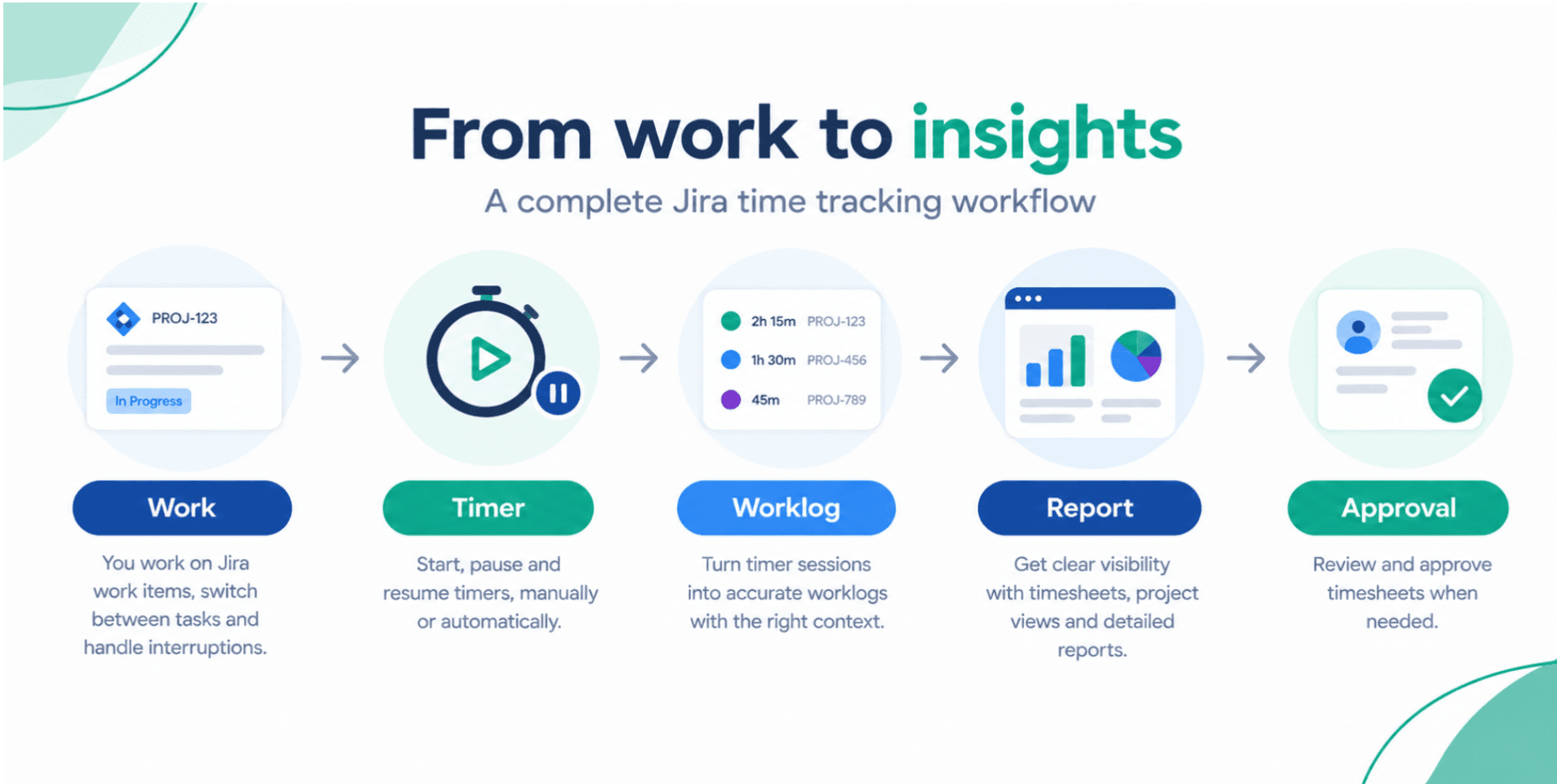
From Compliance to Insight: Making Timesheets Work for Software Teams
Most developers see timesheets as a compliance chore. This guide shows how, with the right digital tools in Jira, time tracking can become a powerful source of delivery insight instead of a weekly headache.
Timesheet Tracking for Jira

Key Takeaways
- Up to 40% of time entries in manual or spreadsheet-based systems are incomplete or inaccurate due to recall bias and admin fatigue.
- Teams that automate and integrate time tracking into their work tools see higher adoption and more reliable data.
- Quality timesheet data enables optimization of processes, estimation, and resource allocation, not just payroll or billing.
- Jira plus a dedicated time tracking addon transforms timesheets from a checkbox task into a continuous improvement engine.
Introduction: Why Developers Dislike Timesheets (and What to Do About It)
Ask a typical software engineer about timesheets and you’ll likely hear the same things:
- "They’re a waste of time."
- "I fill them out on Friday from memory."
- "They don’t help me or the team, just finance."
The result is predictable: poor data quality and low trust in any insight derived from it.
The problem is not time tracking itself, but how it’s implemented. When time tracking is disconnected from daily work, it feels like bureaucratic overhead. When it lives inside Jira and is used to improve delivery, it becomes a valuable feedback mechanism.
How Digital Time Tracking Creates Value Beyond Compliance
Connecting Timesheets to Real Work
Compliance-driven time tracking often lives in:
- Spreadsheets
- Generic HR systems
- Standalone timesheet portals
- Classic, old school timesheet extensions
This fragmentation forces developers to translate their work mentally into time categories.
By embedding time tracking directly into Jira workflows:
- Developers log time on the actual issues they worked on
- Categories (e.g., feature, bug, refactor) can be derived from labels or issue types
- No double entry or context switching is required
Turning Timesheets into Improvement Data
Once you have accurate time data mapped to Jira issues, you can use it to:
- Analyze which parts of the system consume the most effort
- Identify process bottlenecks (e.g., QA, code review, deployment)
- Calibrate estimates based on historical effort
This shifts timesheets from "for finance" to for the team, supporting better decisions and less firefighting.
Reducing the Friction of Time Tracking for Engineers
Capturing Time as Work Happens
The biggest source of error in timesheets is delayed entry. Studies suggest that reconstructing time even a day later can introduce significant inaccuracies.
Integrated digital tools solve this via:
- Automatic timers on Jira issues
- Quick inline logging within the issue view
- Keyboard-driven or API-based logging for power users
Instead of a separate weekly chore, time capture becomes a few seconds per task.
Aligning Categories with How Teams Actually Work
If developers have to choose from opaque cost codes, they disengage. By leveraging existing Jira structures:
- Issue types differentiate feature vs. bug vs. chore
- Labels or components indicate architecture areas
- Epics and projects map to initiatives or clients
Time tracking can reflect real work contexts without extra mental overhead.
Tools: Jira, Confluence, Loom and the Timesheet Gap
Most software teams already rely on:
- Jira for task and sprint management
- Confluence for specs, RFCs, and runbooks
- Loom for async demos and knowledge sharing
These tools are optimized for developer workflows—but timesheets often still sit elsewhere.
Bringing Timesheets into the Developer Toolchain
| Tool | Developer Value | Current Use in Teams | Why Add a Jira Time Tracker |
|---|---|---|---|
| Jira | Central hub for work | Issues, sprints, releases | Natural place to log time with minimal friction |
| Confluence | Design & documentation | Specs, ADRs, troubleshooting guides | Provides context but not effort data |
| Loom | Visual explanations & demos | Code walkthroughs, feature demos | Great for communication, no tie to time spent |
| Time Tracker (e.g., Timesheet Tracking for Jira) | Time & effort analytics | Timesheets & utilization reports | Turns developer activity into actionable metrics |
An integrated time tracker closes the loop between what gets done and how much effort it actually took.
The Solution: Timesheet Tracking for Jira
Timesheet Tracking for Jira is designed with both project managers and engineering teams in mind.
By living inside Jira, it lets teams:
- Log time through easy, lightweight interactions on issues
- Use automatic timers so they don’t have to remember start/end times
- Generate advanced reporting to support both operational and financial needs
- Use planning views to balance workloads and staffing
Features That Make Timesheets Developer-Friendly
- Inline time logging in Jira issues
* No separate portal or URL
* Fits naturally into the existing workflow
- Automatic and manual timers
* Start/pause timers when working on an issue
* Helps capture small, interrupt-driven tasks accurately
- Relevant reporting for teams
* Show effort by issue type, component, epic, or label
* Use data in retrospectives and planning sessions
- Low-friction setup
* Quick to roll out to teams
FAQ: Making Timesheets Useful for Software Teams
How can timesheets help engineering, not just finance?
When integrated with Jira, timesheets reveal patterns that matter to engineers: which areas of the codebase are most expensive to change, where rework is common, and how much time is lost to interrupts or context switching. This data can justify refactoring, tooling investments, or process changes.
Won’t time tracking slow developers down?
Not if the tooling is optimized. With Timesheet Tracking for Jira, logging time is a quick action inside Jira—often just a few clicks or an automatic timer. The small overhead is offset by the benefits in better planning and fewer fire drills.
How detailed should developers be in tracking time?
The goal is useful accuracy, not accounting-level precision. Logging time at the level of Jira issues (or sub-tasks for large efforts) is usually sufficient. You don’t need separate entries for every minute, just clear mapping between significant blocks of work and tickets.
Can timesheet data be misused to micromanage individuals?
Any metric can be misused. The best practice is to focus on team-level trends and process improvements, not individual ranking. Clear communication about why and how the data will be used is essential for team trust.
With the right integration and mindset, timesheets stop being a weekly annoyance and become a valuable input for making software delivery faster, more predictable, and more sustainable. Timesheet Tracking for Jira is built to make that shift as seamless as possible.
Ready to track time in Jira?
Start your free 30-day trial of Timesheet Tracking on the Atlassian Marketplace.