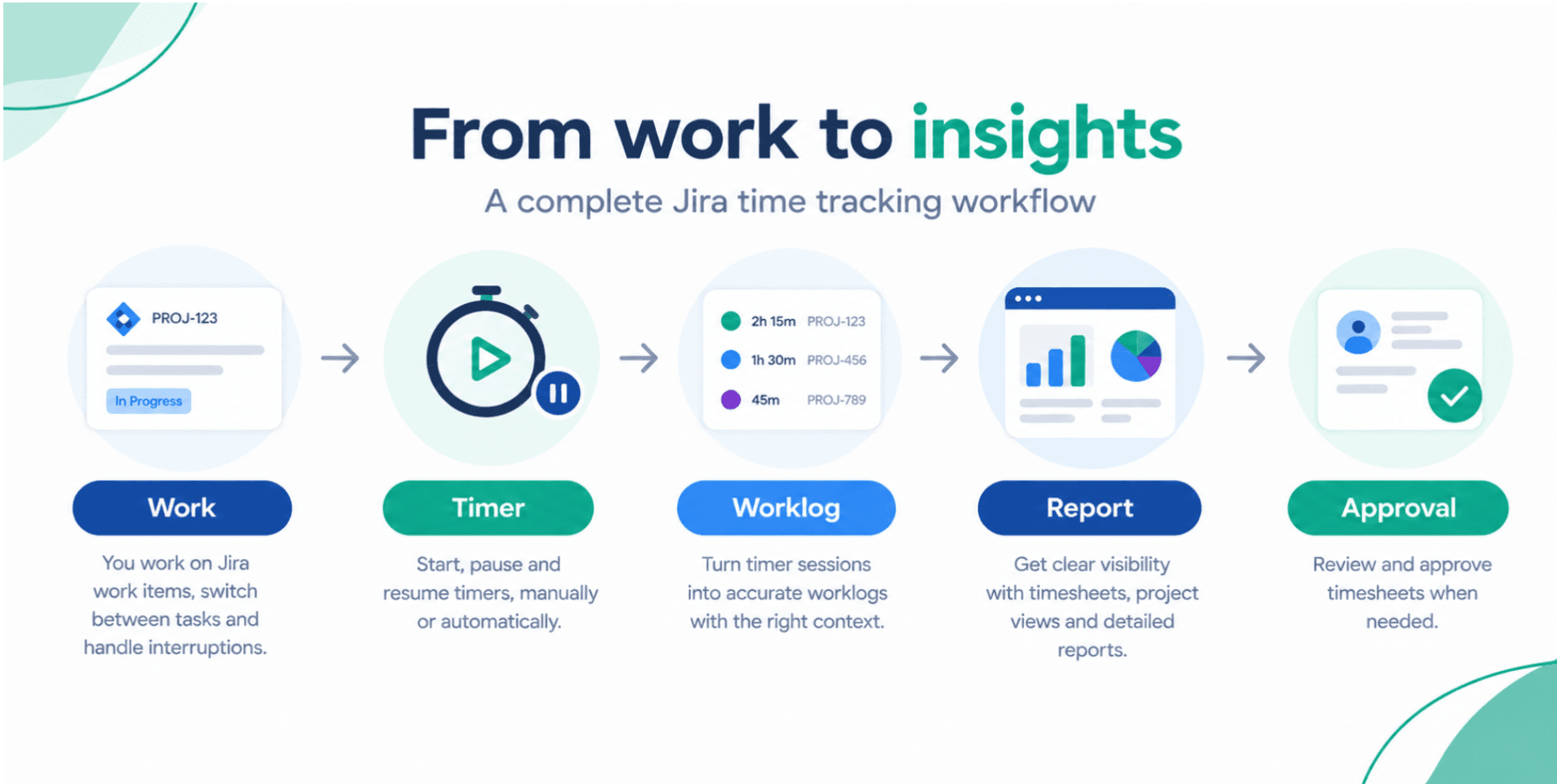
Why Time Tracking Is the Backbone of Modern Project Management
Budget slips, blurred accountability, and unpredictable delivery dates usually have a common root cause: poor time visibility. Learn how structured time tracking, combined with digital tools like Jira, can transform your project performance and keep budgets under control.
Timesheet Tracking for Jira
Key Takeaways
- Organizations with mature time tracking and PM practices are 28% more likely to complete projects on time and 31% more likely to stay on budget (PMI).
- Remote and hybrid teams using digital collaboration and tracking tools report up to 30% higher productivity than those relying on manual or ad-hoc methods (McKinsey).
- Inaccurate or missing time entries can inflate project costs by 10–20% due to unbilled hours, scope creep, and rework.
- Teams that leverage integrated time tracking and analytics tools improve resource utilization by 15–20%, directly impacting profitability.
Introduction: Time Tracking in a Digital-First PM World
Project management has shifted from static Gantt charts and status meetings to always-on, data-driven collaboration. Tools like Jira, Confluence, and Loom orchestrate work, documentation, and communication across distributed teams.
But underneath every sprint, milestone, and release sits a critical metric: time.
Without accurate, real-time visibility into how time is spent, even the best-planned project can:
- Slip on deadlines despite "busy" teams
- Overshoot budgets with no clear explanation
- Struggle to justify invoices to clients
- Fail to forecast capacity and hiring needs
Digital time tracking solves this by connecting actual effort to planned work—directly inside your project management stack.
How Digital Time Tracking Improves Team Collaboration
When teams track time against Jira issues as they work, collaboration becomes transparent instead of reactive.
1. Clear Ownership and Accountability
Instead of vague statements like "Frontend took longer than expected," you can see:
- Exactly which issues consumed the most hours
- Who contributed, and when
- How much effort went into unplanned work vs. planned backlog
This enables constructive, data-backed conversations:
- Why did integration tests double in effort?
- Are code reviews consistently under- or over-estimated?
- Is one team member acting as a hidden bottleneck or rescue resource?
2. Fewer Status Meetings, More Asynchronous Alignment
With digital time tracking embedded into Jira:
- Product owners can see progress against estimates without chasing updates
- Team leads can identify risks mid-sprint
- Stakeholders gain a realistic view of delivery timelines
Instead of long status calls, you can rely on live timesheets and reports.
Supporting Distributed and Remote Work at Scale
Remote and hybrid work have made visibility the new currency in project management. According to Gartner, 74% of CFOs plan to shift some employees to permanent remote work—yet many organizations still rely on end-of-week timesheets built from memory.
This creates several problems:
- Inaccurate reporting of billable vs. non-billable hours
- Hidden overtime and burnout
- Difficulty justifying invoices or change requests
Digital time tracking, integrated directly with Jira issues, provides:
- Real-time visibility into what remote teams are working on
- A single source of truth for sprint capacity and utilization
- Data to support fair workload distribution and prevent burnout
Instead of asking, "What did you work on yesterday?", you can see it in the timesheet tied to actual Jira work logs.
Reducing Operational Costs and Preventing Budget Overruns
Scope creep and budget overruns rarely happen overnight. They accumulate through:
- Small unlogged tasks that "won't take long"
- Frequent context switching and interruptions
- Unplanned support or bug-fix work
Without accurate time tracking, these remain invisible until it's too late.
From Gut Feeling to Evidence-Based Control
By combining time tracking with Jira, you can:
- Detect tasks that consistently overrun estimates
- Quantify the cost of unplanned work and production incidents
- Identify low-value activities that consume disproportionate time
Industry studies show that even modest improvements in estimation and time capture can lower project costs by 5–10%—a huge impact at portfolio scale.
Time data also strengthens your position in client negotiations:
> "This change request added 42 hours of effort across backend, QA, and DevOps. Here is the breakdown per Jira issue."
That's a stronger conversation than "We think it took us about a week."
Real-Time Performance Analytics for Better Decisions
Static timesheets and monthly spreadsheets are too slow for agile teams. To manage risk proactively, you need real-time analytics.
With integrated digital time tracking, you can:
- Monitor burn-down vs. burn-up with actual hours
- Track billable vs. non-billable work per team, project, or client
- Analyze time spent by epic, component, or label in Jira
- Compare estimated vs. logged hours to continuously improve planning
Over time, this creates a feedback loop:
- Plan sprints and releases
- Track time in Jira as work happens
- Analyze variances and bottlenecks
- Adjust estimates, staffing, and scope with confidence
This is what separates reactive project management from data-driven delivery.
How Your PM Stack Fits Together: Jira, Confluence, Loom… and a Time Tracker
Most software and product teams already use a standard digital toolbox:
- Jira – Issue tracking, agile boards, workflows
- Confluence – Project documentation, decision logs, specs
- Loom – Asynchronous video updates, demos, stakeholder communication
These tools solve _what_ is being done, _why_ it matters, and _how_ it should work. What they don’t solve natively is:
> Exactly how much time did this work actually take, and what did it cost?
Tool Integration Summary
| Tool | Primary Purpose | Strengths | Missing Piece for Budgets |
|---|---|---|---|
| Jira | Issue & project tracking | Agile workflows, backlog, reporting | Detailed, accurate time tracking & cost view |
| Confluence | Knowledge & documentation | Requirements, specs, meeting notes | Link effort data back to documented decisions |
| Loom | Async communication & demos | Visual updates, stakeholder alignment | No direct link to effort or billable hours |
| Time Tracker (e.g., Timesheet Tracking for Jira) | Effort, cost, and utilization tracking | Native to PM workflow, reporting & billing | Connects work to time, budgets, and invoices |
A dedicated time tracker integrated into Jira closes the loop, giving you a full view from idea → issue → effort → cost.
The Solution: Timesheet Tracking for Jira
Timesheet Tracking for Jira is built specifically for teams that run their work in Jira and need accurate, effortless time capture.
Instead of asking people to fill in manual spreadsheets or remember their week on Friday, Timesheet Tracking for Jira:
- Integrates natively with Jira – log time directly on issues, epics, and subtasks
- Captures time as it happens with automatic timers and easy manual logging
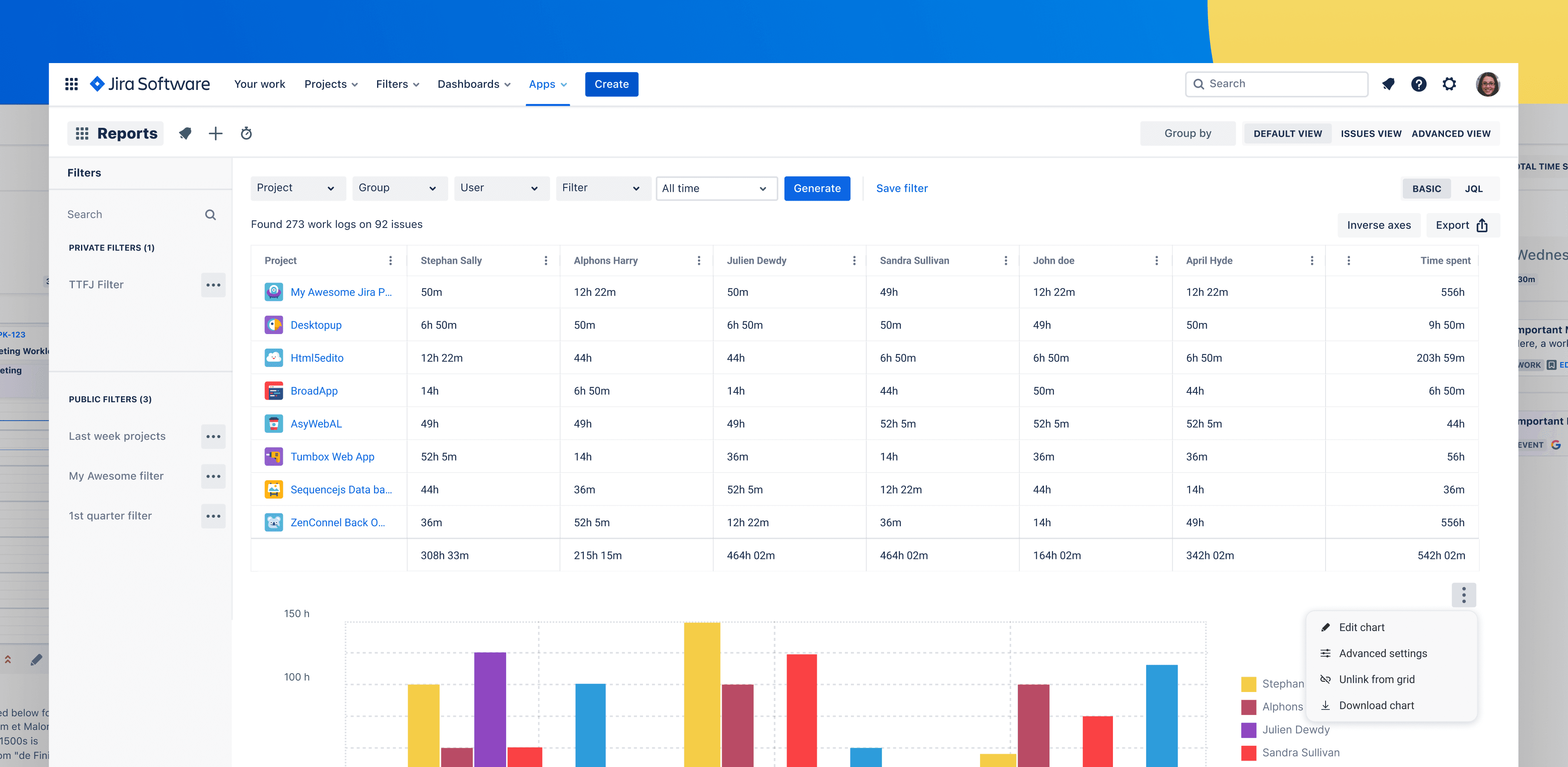
- Keeps projects on budget with advanced reporting on hours, utilization, and billable vs. non-billable work
- Supports planning with capacity, workload, and forecast views across projects
Key Features for Project Managers and Team Leads
- Automatic timers
* Start/stop timers from Jira issues so time is tracked in real time
* Reduce errors from after-the-fact guessing
- Easy logging
* Quick-add worklogs directly in Jira
* Intuitive UX for developers and non-technical roles
- Advanced reporting
* Analyze time by project, epic, user, or label
* Export reports for finance, invoicing, and stakeholders
- Planning & resource management
* View capacity and workload across teams
* Allocate resources based on real historical effort
Because it’s a cloud-based solution, your distributed teams can access it from anywhere, with data always in sync.
To understand how your data is handled, you can review the End User License Agreement.
FAQ: Time Tracking and Digital Tools in Project Management
Why is time tracking important in agile project management?
Agile emphasizes iterative delivery and continuous improvement. Without accurate time tracking, your velocity, capacity planning, and forecasting become guesswork. Logging time against Jira issues helps you understand how much effort different types of work require, refine story point calibration, and negotiate scope more effectively with stakeholders.
How does time tracking reduce project costs?
Time tracking makes cost drivers visible. By seeing exactly where hours go—unplanned work, rework, meetings, technical debt—you can remove low-value activities, control scope creep, and justify change requests. This leads to more accurate estimates, better utilization, and lower overall delivery costs.
Is digital time tracking suitable for remote and hybrid teams?
Yes. For remote teams, digital time tracking is often essential. It provides transparency into workload and progress without micromanagement, supports fair distribution of tasks, and gives leadership the data they need to manage budgets and timelines across locations and time zones.
Why not just rely on Jira’s built-in work logs?
Jira’s native work logs are a starting point, but they lack the robust reporting, planning, and analytics needed for serious budget and resource control. Timesheet Tracking for Jira adds specialized timesheet views, advanced reporting, automatic timers, and planning capabilities—turning basic work logs into a comprehensive time management and cost visibility solution.
If you run your projects in Jira and want to improve budget control, forecasting, and accountability, implementing structured time tracking with Timesheet Tracking for Jira is one of the fastest, least disruptive ways to get there.
Ready to track time in Jira?
Start your free 30-day trial of Timesheet Tracking on the Atlassian Marketplace.