From Guesswork to Forecasts: Using Time Tracking Data to Predict Project Outcomes
Most project plans fail not in the planning tools, but in the assumptions behind them. Discover how disciplined time tracking in Jira turns historical effort data into reliable forecasts and keeps delivery predictable.
Timesheet Tracking for Jira

Key Takeaways
- Only 43% of organizations report that most or all of their projects are delivered on time (PMI), often due to poor effort forecasting.
- Teams that use historical time tracking data improve estimation accuracy by 20–30% over several iterations.
- Underestimated work and hidden rework can consume 15–25% of total project hours if not tracked rigorously.
- Integrating time tracking with Jira unlocks predictive analytics on velocity, capacity, and likely delivery dates.
Introduction: Why Project Forecasts Fail
You can have a perfect roadmap in Jira, detailed Confluence specs, and well-run sprint ceremonies, yet still miss deadlines and burn through budgets.
The underlying problem is usually the same:
> Forecasts built on gut feeling instead of empirical time data.
In modern software and product development, digital time tracking acts as the measurement layer that turns your Jira boards into a true forecasting engine.
By logging time consistently, your team can:
- Calibrate estimates against reality
- Predict delivery dates with higher confidence
- Understand true capacity beyond story points
How Digital Time Tracking Improves Forecasting Accuracy
Calibrating Estimates with Real Effort
Story points and T-shirt sizes are useful, but they are subjective. When every Jira issue also has actual hours logged, you gain a hard baseline:
- Feature X: consistently 24–30 hours
- Small bug: typically 2–4 hours
- Security audit: 40+ hours across roles
Over a few sprints, patterns emerge that help you:
- Refine estimation templates
- Detect systemic underestimates (e.g., testing, integration work)
- Better size future projects with similar scope
Understanding Real Capacity vs. Theoretical Capacity
Traditional capacity planning might assume a developer has 6–7 productive hours per day. Time tracking reveals the truth:
- Meetings and ceremonies: 1–2 hours
- Support and incidents: 0.5–1.5 hours
- Admin overhead: 0.5 hours
The result? Real capacity for focused work may be closer to 4–5 hours.
With time tracking integrated into Jira, you can measure this per team and adjust sprint commitments accordingly.
Handling Scope Changes and Reducing Forecast Risk
Scope rarely stays fixed. Requirements shift, stakeholders change their minds, and technical surprises appear.
Without time tracking, you only see that "we're behind." With it, you can:
- Quantify the effort of late-breaking changes
- Separate baseline work from change requests
- Show stakeholders the impact of additional features in hours and cost
This reduces risk by enabling explicit trade-offs:
> "This new integration will add \~80 hours. To keep the deadline, we must descope two lower-priority items totaling 70–90 hours."
Time data changes the conversation from opinion to evidence.
Remote Teams, Distributed Work, and Forecast Reliability
For distributed teams, visibility gaps can quickly derail forecasts:
- Time zone differences delay clarifications
- Ad-hoc work absorbs capacity without being tracked
- Local priorities diverge from central plans
Digital time tracking brings everyone onto the same baseline:
- All work is logged against Jira issues
- Cross-location comparisons become possible
- Leaders can see global capacity and bottlenecks
Studies on remote productivity show that clear KPIs and transparent workloads can increase performance by up to 30% (McKinsey). Time tracking underpins that transparency.
Your Toolchain: Jira, Confluence, Loom, and the Forecasting Gap
You likely already rely on a strong toolchain:
- Jira for issues, epics, and releases
- Confluence for specs and documentation
- Loom for asynchronous demos and stakeholder updates
These tools capture _what_ you plan to do and _why_—but forecasting requires a third dimension: how long things _actually_ take.
How Tools Work Together for Forecasting
| Tool | Role in Forecasting | Strengths | Gap Without Time Tracking |
|---|---|---|---|
| Jira | Plan & track work items | Roadmaps, backlogs, workflows | Lacks granular historical effort by pattern |
| Confluence | Capture requirements & decisions | Context for scope and complexity | No direct connection to time spent |
| Loom | Communicate progress & expectations | Stakeholder alignment | No tie to delivery cost or duration |
| Time Tracker (e.g., Timesheet Tracking for Jira) | Measure effort & utilization | Turns history into forecastable data | Enables evidence-based capacity & timelines |
To move from guess-based to data-driven forecasts, an integrated time tracker is the missing link.
The Solution: Timesheet Tracking for Jira
Timesheet Tracking for Jira is designed for teams that want to turn their Jira history into a forecasting advantage.
Because it lives inside Jira, teams can:
- Log time directly on issues with easy logging and automatic timers
- Generate advanced reports on effort by epic, component, project, or user
- Analyze estimate vs. actual variances over time
- Feed this data back into planning, capacity, and roadmapping
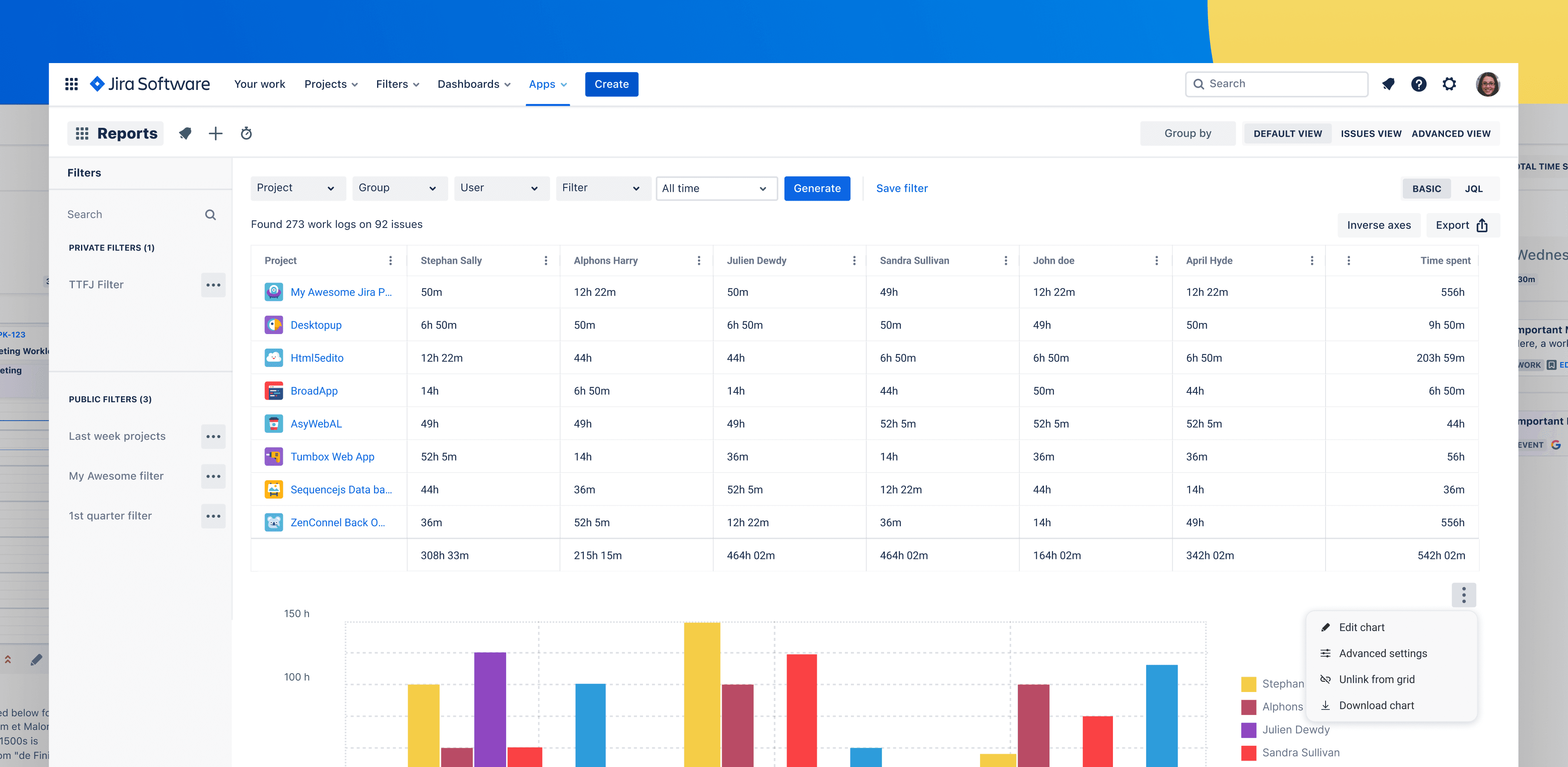
Key Capabilities for Forecasting
- Automatic timers: Capture time as work happens, reducing data gaps and recall bias.
- Planning views: See capacity by person and team, based on both scheduled work and historical patterns.
- Effort analytics: Compare similar initiatives, identify systemic underestimates, and refine planning templates.
- Reporting for stakeholders: Share clear, data-backed forecast updates with clients, executives, and finance.
FAQ: Forecasting with Time Tracking
How does time tracking improve agile estimation?
Time tracking grounds agile estimation in historical evidence. Over multiple sprints, you can compare planned vs. actual effort per story type, team, or component. This enables more realistic story point scales, better capacity planning, and higher confidence in release forecasts.
Can time tracking help with long-term roadmap planning?
Yes. By aggregating time data across comparable projects or epics, you can build effort ranges for future initiatives. For example, if three previous integrations averaged 160–200 hours, you can plan the next integration with more realistic budget and timeline assumptions.
Is time tracking too heavy-weight for high-velocity teams?
Not if it is integrated smoothly into existing workflows. With Timesheet Tracking for Jira, developers log time where they already work, on Jira work items, using quick actions or automatic timers. This minimizes friction while still producing high-quality data.
How do I start using Timesheet Tracking for Jira ?
Begin by enabling time logging on your active projects, ensuring teams record time against relevant Jira issues. After a few sprints, use the reporting and analytics features in Timesheet Tracking for Jira to analyze variance patterns and refine your capacity and estimation models.
When your forecasts are built on real effort data instead of best guesses, delivery becomes more predictable. Trust with stakeholders grows accordingly. Integrated time tracking in Jira is one of the most effective ways to get there.
Ready to track time in Jira?
Start your free 30-day trial of Timesheet Tracking on the Atlassian Marketplace.